在 LicheePi 4A 上运行 openEuler 24.03
测试环境:
- LicheePi 4A 8+8 内测版
下载安装 openEuler 系统并设置从 tf卡启动
首先下载openEuler系统镜像,下载地址
需要下载root和boot分区镜像,以及uboot镜像。根据你的板卡内存大小选择合适的镜像,8G选择u-boot-with-spl-lpi4a.bin,16G选择u-boot-with-spl-lpi4a-16g.bin
烧写步骤可以参考 这篇文章 和 这篇文章,这里就不赘述了,这边主要补充如何在内测版硬件上使用tf卡启动。
首先,把boot分区按照正常的步骤烧写到emmc中,然后将root分区烧写到tf卡中。
复制一份/boot/extlinux/extlinux.conf 文件,并命名为extlinux_tf.conf
cp /boot/extlinux/extlinux.conf /boot/extlinux/extlinux_tf.conf修改里面的文件成下面的内容,主要是把原本的root=/dev/mmcblk0p3变成root=/dev/mmcblk1。mmcblk0是emmc,mmcblk1是tf卡
menu title U-Boot menu for openEuler RISC-V TH1520
         timeout 50
         default openEuler-riscv

         label openEuler-riscv
                 menu label Linux openEuler-riscv
                 kernel /vmlinuz-6.6.0-27.0.0.31.oe2403.riscv64
                 fdtdir /dtb-6.6.0-27.0.0.31.oe2403.riscv64
                 append root=/dev/mmcblk1 console=ttyS0,115200 rootwait rw earlycon clk_ignore_unused loglevel=7 eth= rootrwoptions=rw,noatime rootrwreset=yes selinux=0
然后重启系统,使用串口在启动过程中中断自动启动,进入uboot命令行。需要注意的是板卡的rx引脚已经有分压电阻,无需再进行电平转换,可以直接接入3.3v ttl,tx是1.8v ttl,所以tx可能需要一个电平转换器。
添加下面两个环境变量,并保存
setenv mmccheck 'if mmc dev 1; then setenv boot_conf_file /extlinux/extlinux_tf.conf; else setenv boot_conf_file /extlinux/extlinux.conf;fi'

setenv bootcmd 'run bootcmd_load; bootslave;run mmccheck; sysboot mmc ${mmcdev}:${mmcbootpart} any $boot_conf_addr_r $boot_conf_file;'

saveenv
然后再次重启,就能看到已经成功从tf卡启动了,如果你要从emmc启动原本的系统,可以把tf卡拔掉,再次启动。
可以通过下面的命令对分区进行扩容。
sudo resize2fs /dev/mmcblk1由于oERV 24.03主线用的是 6.6 内核,暂时没有HDMI驱动,因此需要使用ssh进行远程连接
首先按照这个教程安装xfce桌面环境,再按照这个教程安装ROS2环境
在/etc/ssh/sshd_config中修改X11Forwarding项为yes
然后重启sshd
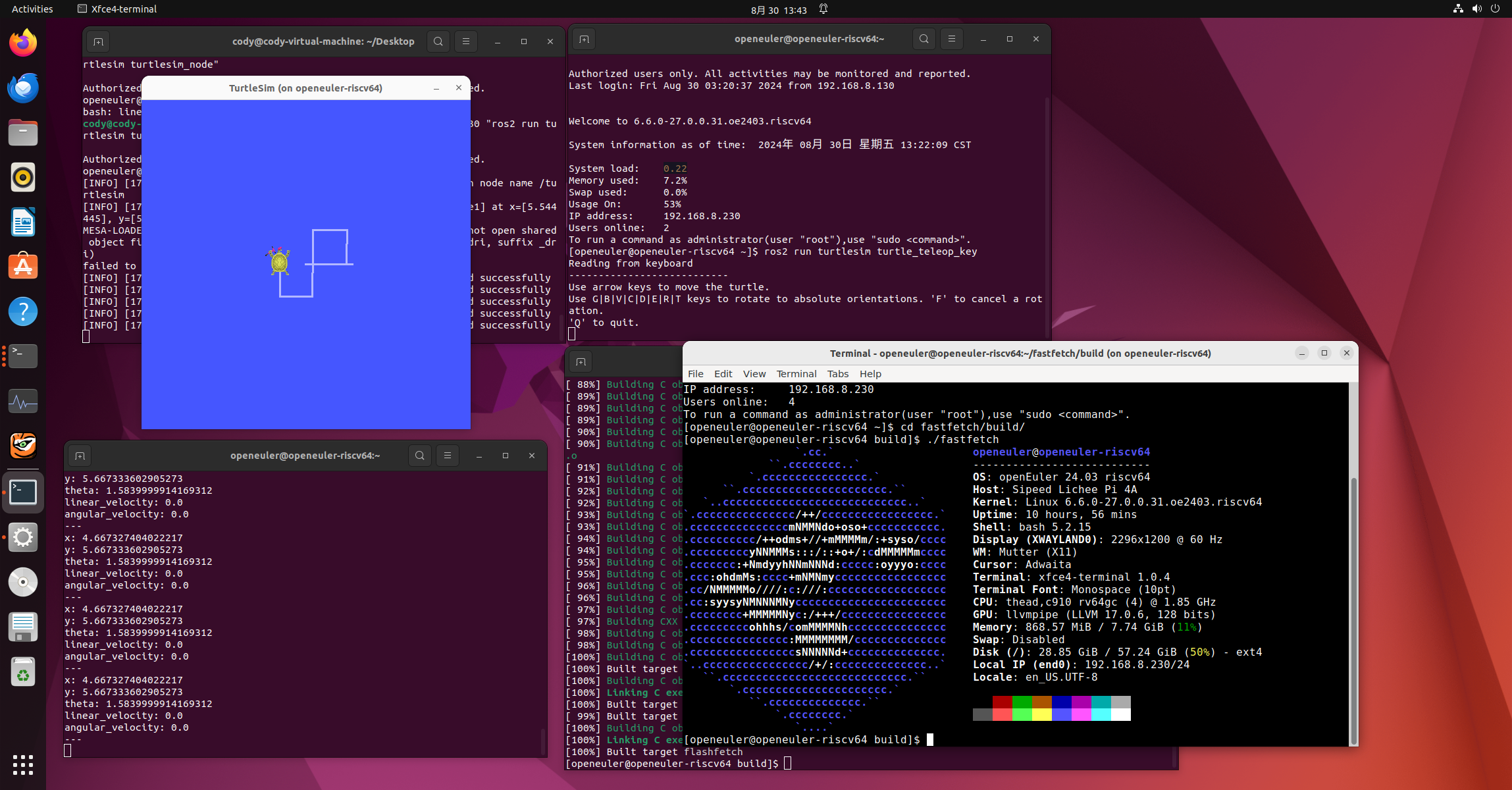
sudo systemctl restart sshd就可以在你的电脑上使用下面的命令通过x11forward启动Licheepi 4A上的小海龟界面了,同理,其他需要显示界面的程序都可以这样显示
ssh -X [email protected] "ros2 run turtlesim turtlesim_node"
参考文章
https://openeuler-ros-docs.readthedocs.io/en/latest/installation/lpi4a-rv-oe.html
https://bbs.eeworld.com.cn/thread-1258199-1-1.html
https://docs.openeuler.org/en/docs/22.03_LTS_SP1/docs/desktop/installing-Xfce.html
https://github.com/revyos/th1520-linux-kernel/commits/th1520-lts-wip/
https://wiki.sipeed.com/hardware/zh/lichee/th1520/lpi4a/4_burn_image.html
https://github.com/revyos/revyos/blob/main/Installation/licheepi4a.md
 Cody Gu